
Best Call Management & Dialer App for Android (2026)
Best Call Management App for Android: 2026 Comparison
Your smartphone is your office. But is your “Phone” app working for you, or against you? If you rely on your phone for business—sales, real estate, consulting, or services—the default Android dialer is likely costing you money and missed opportunities. You need a robust call manager app.
But with so many tools on the market, which one is truly the best? Should you stick with the native dialer, upgrade to a heavy Mobile CRM, pay for an expensive VoIP system, or use a specialized productivity app like MemoCallPro?
In this comprehensive 2026 comparison, we evaluate the top options available to help you choose the best call management app for android to fit your professional needs.
2026 Android App Comparison at a Glance
| App Name | Category | Best For | Key Feature | Pricing |
|---|---|---|---|---|
| MemoCallPro | Dedicated App | Independent Professionals | In-call popup & notes | €3.79 (Lifetime) or €2.79/mo |
| iSung Call Note | Dedicated App | Personal Use | Call note capturing | Free (with ads) |
| Drupe | Dialer / Contacts | Fast outreach | Quick contact actions | Freemium (~€10) |
| Aircall | VoIP | Support Centers | Shared business lines | $30+/user/month |
| RingCentral | VoIP | Large Enterprises | Video & messaging hub | $20+/user/month |
| Runo | CRM Mobile App | Telecalling Teams | Outbound call tracking | $5+/user/month |
| HubSpot | CRM Mobile App | Large Sales Teams | Extensive reports | Free to $100+/seat/mo |
Article Overview:
- What is a Call Management App? (Understanding the core concept & key features)
- Best Android Dialer Apps vs Call Management Apps (What’s the Difference?)
- The Different Types of Applications (Native Dialers, Mobile CRMs, VoIP Apps, and Dedicated Solutions)
- Realistic Tool Comparisons (MemoCallPro vs. Truecaller, Salesforce, Aircall, etc.)
- Why MemoCallPro Wins
- Conclusion: Choosing the Best Fit
What is a Call Management App?
A Call Management App is more than just a phone book. It is a tool designed to organize, track, and optimize your phone interactions. Unlike standard dialers, a dedicated Call Management App provides context before, during, and after every call.
In today’s fast-paced business environment, relying on memory is a risk you cannot afford. Whether you are a realtor, a salesperson, or a healthcare provider, your phone is your primary tool. A professional Call Management App transforms this tool from a passive receiver into an active assistant.
Key Features
- 📝 In-Call Notes: The core feature of any good Call Management App: take notes while you talk.
- 📅 Calendar Sync: Turn calls into meetings. Our Call Management App links directly to Google Calendar.
- 🔍 Smart Search: Find any detail from any conversation. That’s the power of a Call Management App.
Best Android Dialer Apps vs Call Management Apps: What’s the Difference?
Many people search for the best dialer apps for android 2026, expecting a tool that just changes the look of their phone dialer. A standard dialer app simply connects the call and perhaps offers a T9 search for contacts. However, a true call management app for android goes much further. While dialers focus on making the call, call management apps focus on the context of the call—giving you notes, history, and CRM integration directly on your screen.
Why Professionals Need a Call Management App
The Problem with Standard Dialers
Most professionals use the default phone app that comes with their device. While functional for personal use, it lacks the critical features needed for business. It tells you who is calling, but not why. It logs the time, but not the content. This “dumb dialer” approach leads to missed opportunities and forgotten details.
A Call Management App fills this gap. It acts as a bridge between your communication and your productivity tools. It ensures that every interaction is captured, categorized, and actionable.
Privacy First: Local vs Cloud
Many CRM solutions and VoIP apps require you to upload your entire contact list to their servers. This poses significant privacy risks and GDPR compliance issues.
MemoCallPro takes a different approach: Local First. Your data stays on your device. We do not monetize your contact list. This makes it the safest Call Management App for sensitive industries like law and healthcare.
Use Cases impacting ROI
- Real Estate: A client calls about a listing. With a Call Management App, you see their budget and preferences instantly. You close the deal faster.
- Sales: You track 50 leads. The app reminds you who is “Warm” and who is “Cold” before you answer.
- Medical: Managing patient follow-ups becomes seamless with secure, local notes attached to caller IDs.
The Best Call Management Apps in 2026: Category Breakdown
Choosing the right tool is critical for your workflow. Here are the top contenders broken down into three main categories.
1. Best Dedicated Call Management Apps & Dialers (Non-VoIP, Non-CRM)
These are tools that act as an intelligent layer over your existing phone and SIM card. For many seeking the best dialer apps for android 2026, these dedicated tools offer the perfect blend of dialer functionality and advanced business management without requiring a virtual number or a massive CRM setup.
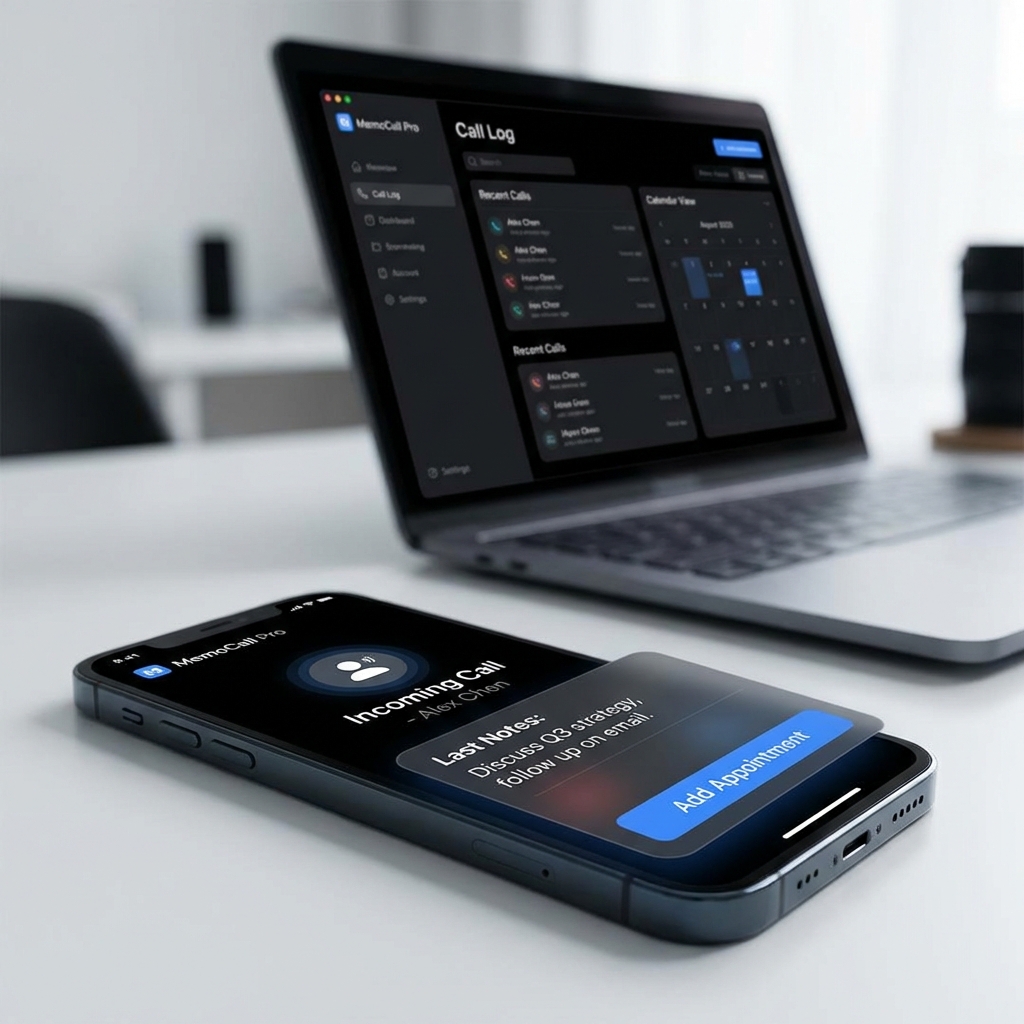
- MemoCallPro 🥇 The best dedicated Call Management App for independent professionals on Android. It identifies your saved contacts and displays a smart popup during the call, letting you take context-sensitive notes without ever hanging up. Built on a “Local First” architecture, your data stays entirely on your device.
Why it stands out:
- Privacy: All data is stored locally. No cloud sync, no data mining, no server breach risk critical for lawyers, doctors, and consultants.
- Simplicity: No account creation required. Install, import your contacts, and you are ready. Setup takes under two minutes.
- Price: MemoCallPro has two versions. * Basic (one-time €3.79): in-call notes, call log, and contact management. * Pro (€2.79/month): everything in Basic, plus calendar, planning assistant, backup, and AI features. A free trial is available.
What MemoCallPro does not cover:
-
iOS is not supported due to Apple’s system-level access restrictions this applies to all non-VoIP overlay apps, not just MemoCallPro.
-
No automatic call recording or transcription. Notes are manual, which also means your conversations stay 100% private.
-
iSung Call Note
-
This is a simple and intuitive app for capturing your ideas, managing your call notes, and organizing your daily information in a single digital notebook with various themes. It’s useful for everyday use and offers customization options for call notes.
-
Pricing: Free version available with basic note-taking. Some ads can showup.
What iSung Call missing ? :
-
The app not show all the time the pop up window during the call. Despite MemoCallPro, it does not have a clear CRM/Contact management system or a clear call-log management system.
-
Drupe Advanced Call Manager
-
Drupe takes a different approach to call management by focusing on contact accessibility and communication speed.
That said, Drupe is built primarily around outreach and contact navigation rather than in-call context or business note-taking, which limits its usefulness for professionals who need to capture information during a live conversation.
- Pricing: Free to download on Android A lifetime in-app purchase unlocks premium features (approximately €8 to €10 depending on region). A monthly subscription option is also available at a lower entry cost. No mandatory account required for basic use.
What Drupe is missing ? :
- No in-call note-taking overlay tied to the caller’s business profile.
- Communication logs are useful but not designed for capturing business context mid-call.
- The last version of the app is 2021
2. Best VoIP Call Management Apps
VoIP apps provide you with a virtual phone number (over the internet). They are ideal for customer support centers or teams that need a shared business line.
-
Aircall
-
An incredibly powerful VoIP platform for support teams. It integrates with almost everything but requires a strong internet connection and comes with a high monthly subscription cost per user.
-
Pricing: Essentials plan at $30/user/month (billed annually), Professional at $50/user/month (billed annually). A minimum of 3 licenses is required on all base plans, meaning the real entry cost starts at $90/month. AI features and advanced analytics are available as paid add-ons on top of the base price.
-
RingCentral
-
An enterprise-grade communication hub that includes video and messaging alongside VoIP. It is feature-rich but can be overwhelming (and expensive) for a solo entrepreneur or small team.
-
Pricing: Core plan from $20/user/month (billed annually), Advanced at $25/user/month, Ultra at $35/user/month. AI tools (RingSense), contact center (RingCX at $65/user/month), and other advanced features are sold as separate add-ons, which can push the real monthly cost 20 to 40% above the advertised base price.
3. Best CRM Mobile Apps for Call Management
These are the mobile extensions of massive desktop customer relationship databases.
-
Runo
-
Runo specializes in mobile CRM and outbound call tracking. It’s excellent for telecalling teams needing strict tracking and reporting. However, it functions more as a strict management tool rather than a personal productivity aide. if you are looking for a CRM for your business, this app is for you.
-
Pricing: Starting at $5/user/month. A free trial is available. Pricing scales with team size and feature requirements; contact the vendor for team plans.
-
HubSpot
-
Powerful for large sales teams that need to sync databases and run extensive reports. However, their mobile apps are often slow, require stable cloud connections, and their caller ID features can be clunky during an active incoming call.
-
Pricing: A free CRM tier is available with limited seats. Sales Hub Starter starts at $20/seat/month. Sales Hub Professional starts at $100/seat/month with an annual commitment required. Enterprise tiers and multi-hub bundles can reach $10,000 to $50,000+ per year for mid-sized teams, plus one-time onboarding fees on higher tiers.
Why MemoCallPro is the Best Call Management App for Android
The market splits into two extremes: native dialers that offer zero business context, and heavy CRMs that are too complex, too slow, and built for entire sales teams. MemoCallPro occupies the only useful middle ground a smart call management app built as an intelligent layer on top of your existing SIM card, with no virtual number, no expensive subscription, and no training required.
It does one thing exceptionally well: displaying the right context at the right moment. And it does it better than any other call notes app on the market.
But context is just the beginning. Where most call management apps stop at logging a call, MemoCallPro goes further combining real-time caller identification, in-call note-taking, and a full suite of professional tools designed for independent professionals and small businesses who cannot afford to miss a single opportunity.
Everything included in one call management app
- Call notes, captured instantly MemoCallPro is a dedicated call notes app that lets you attach context, observations, and follow-up actions directly to each call, linked to the contact’s full history. No more post-call scramble, no more forgotten details.
- SMS confirmation: MemoCallPro automatically sends a confirmation message after a call using your SMS prodider (SMS, Messenger, Email), keeping clients informed and projecting a professional image without any extra effort.
- Availability hours define your reachable windows and let the app manage client expectations around your schedule.
- Bulk contact import bring your entire client base in at once, with no manual entry required.
- Desktop version manage your contacts, notes, and agenda from your computer when you are not on the move.
- Smart agenda automatically detects open time slots so you never double-book and always know when you are free.
- Planning assistant suggests the best times to schedule follow-ups and callbacks based on your real availability.
- Auto-pattern rules set recurring logic for how calls and contacts are handled, so routine tasks run themselves.
- Multi-criteria search find any contact, note, or call by combining filters across your entire history in seconds.
- Micro CRM a built-in lightweight CRM that centralizes your client relationships without the complexity or cost of a full platform.
- Integrated reminders attach reminders directly to contacts and calls so no follow-up ever falls through the cracks.
No other dedicated call management app on Android combines overlay intelligence, a native call notes app experience, a built-in SMS confirmation app, local-first privacy, and this depth of business tooling all at a price point that makes sense for professionals who work alone or in small teams.
Conclusion
If you manage a large call center, a VoIP solution like Aircall is necessary. If you are managing a massive outbound telecalling team, a CRM tool like Runo makes sense.
However, if you are a professional (realtor, consultant, doctor, artisan) who wants a Call Management App that respects your time and privacy without the complexity of a CRM or the cost of a VoIP system—dedicated overlay apps are the way to go.